
What does managed IT support include? Check the scope before you sign

Two IT support proposals can name the same services yet leave very different jobs with your team. What does managed IT support include? The useful answer is the work your agreement covers, for named people and systems, with clear responsibilities when something needs a supplier or a separate project.
Use the example below to turn a package description into a record you can discuss with a provider. You should finish with agreed ownership, visible gaps and a clear next step, rather than assumptions about what “support” means.
What does managed IT support include in your agreement?
Start with an ordinary task your business depends on: opening the accounts application, receiving orders or accessing a shared work folder. Ask the provider to explain what happens when that task stops working.
A scope record connects three things: what is covered, who does the work and what happens at the boundary. A list of tools alone cannot answer those questions. If you are still deciding whether ongoing support is worthwhile, our guide to managed IT support when you rarely call addresses that earlier decision.
For each important system, name the supported users, devices and locations. Then distinguish routine investigation from a change that needs assessment. Creating a standard account and moving a business to a new system may involve different work, but neither should be labelled included or excluded without checking the agreement.
A worked example: the accounts application will not open
Illustrative scenario only. This fictional five-person office is not a Cache4 customer case study. The responsibilities below are sample terms to discuss, not a statement of Cache4 contractual coverage.
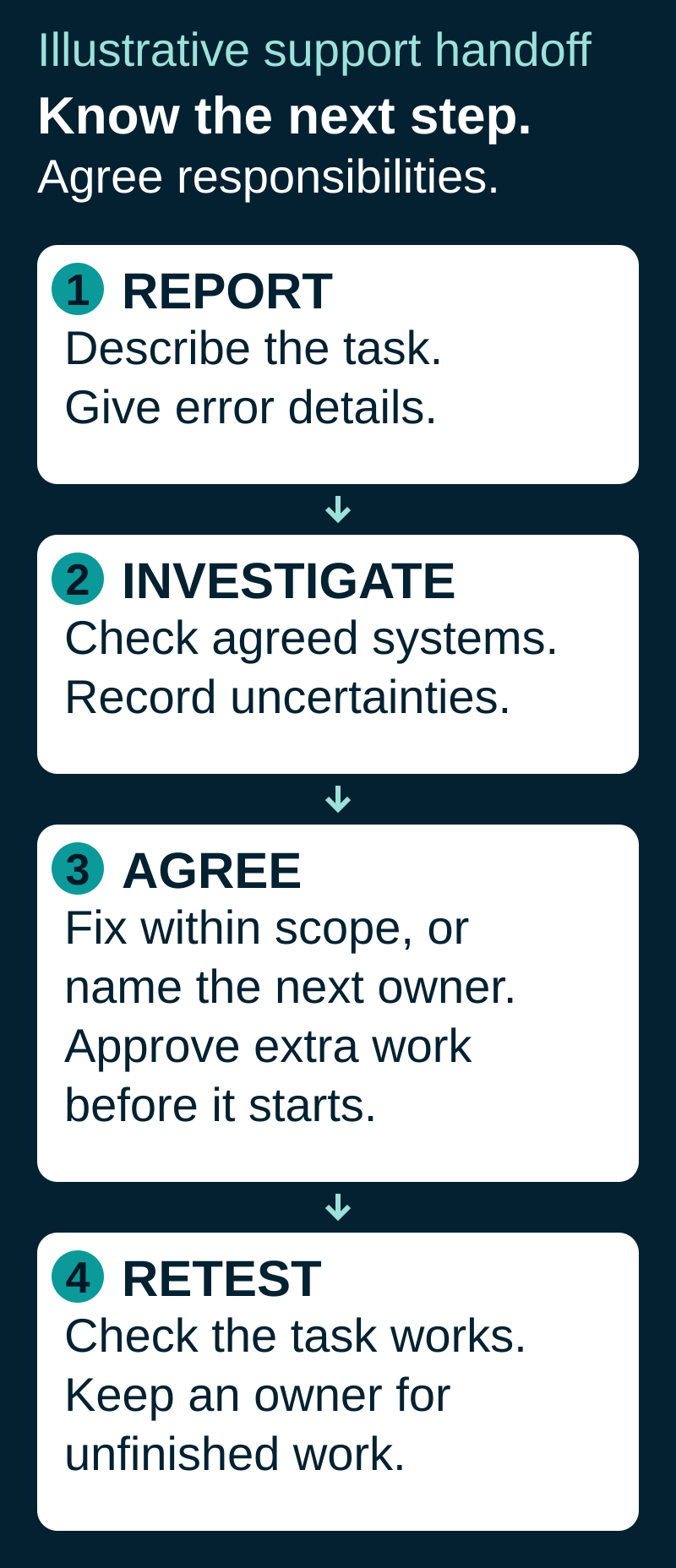
1. Give the support team a useful starting point
The office manager reports that one colleague cannot open the accounts application on their usual work laptop. They provide the error wording, when it started, the affected user and device, and whether other colleagues can work. The business task is specific: preparing invoices. No passwords or unnecessary customer records go in the ticket.
Their sample agreement covers remote investigation of that laptop, sign-in and its normal network connection. Application-specific faults remain the software supplier’s responsibility, with liaison arrangements recorded separately.
2. Investigate within the agreed scope
The support provider checks the reported symptoms and the supported device, sign-in and connection as appropriate. They record what they checked and what remains uncertain. If the fault is within their agreed responsibility, they work on it through the normal support process.
If the evidence points to the accounts application itself, the next step is a named handoff, not “contact your software company” without context. The record identifies who opens the supplier case, which checks can be shared and who keeps the office manager updated. The business may need an active supplier support agreement or an authorised contact.
3. Agree additional work before it starts
Suppose the application supplier recommends a version upgrade that requires installation and testing across the office. That changes the work being discussed. The provider assesses the requirement and confirms whether it is included, separately quoted or outside the agreement. The office manager approves any additional charge and suitable timing before extra work begins.
A first response, a progress update, a temporary workaround and a completed fix are different milestones. Ask what each means in your agreement, when its clock runs and how a supplier dependency affects the next update. Do not treat a response target as a promise that every fault will be resolved within that period. Monitoring hours also do not establish when a staffed helpdesk is available.
4. Verify the business task and record the outcome
After the agreed fix, the affected colleague checks that the application opens and the necessary invoice task works. The support record captures the action taken, the user’s check and any remaining follow-up. A case passed to a supplier should still have a visible owner and next step; a handoff alone is not evidence that the business can work again.
Here is the useful output from the example:
Covered work: remote investigation of the named laptop, sign-in and connection, as specified in the sample agreement.
Application owner: accounts-software supplier for an application-specific fault; the agreed contact opens the supplier case.
Next update: the agreed contact confirms the supplier case reference and next review point.
Business decision: office manager approves any separately quoted upgrade and its timing.
Completion evidence: affected colleague verifies the required task; unresolved work retains an owner and next action.
This makes the practical benefit visible: the manager can see who is responsible and what decision is needed, rather than chasing several organisations without knowing which part each owns.
Use this scope record for your own systems
Copy these fields into a document and complete one record with your provider for each business-critical system. Keep “unclear” visible until someone resolves it.
Business task and system: ______
Covered people, devices and locations: ______
Included investigation and routine changes: ______
Separately quoted work, exclusions or unclear points: ______
Who reports the issue and authorises access or changes: ______
Who investigates, contacts suppliers and owns the next update: ______
Support hours, response definition and escalation route: ______
How additional work is approved: ______
Who checks the result and what counts as complete: ______
For a system relying on backups, also agree which data or service is covered and who may authorise a restore. For staff changes, establish who provides the access decision and required notice. These are business responsibilities as well as technical tasks.
Then compare proposals using the same records. Ask each provider to confirm or correct the entries in writing. For the separate question of fees and cost models, see our guide to IT support costs for a small UK business. A clear scope makes that price comparison more meaningful.
Clarify the support your business needs
Cache4’s Managed Security & Support service combines Managed Security Essentials with day-to-day remote helpdesk support, Microsoft 365 management and user onboarding and offboarding. Supplier liaison is available where needed within the agreed scope.
If you want to understand how that fits your business, book a free discovery call. Bring your current scope, your important systems and two or three recurring problems. We can discuss the support you need and the responsibilities to clarify before you choose a service.


Comments